
Link in bio guide
What to put in your link in bio
Your link in bio is the next step for someone who just saw one of your posts. Lead with one main action, keep the rest short and specific, and check it once a month. This guide shows what to include, in what order, with examples you can copy.
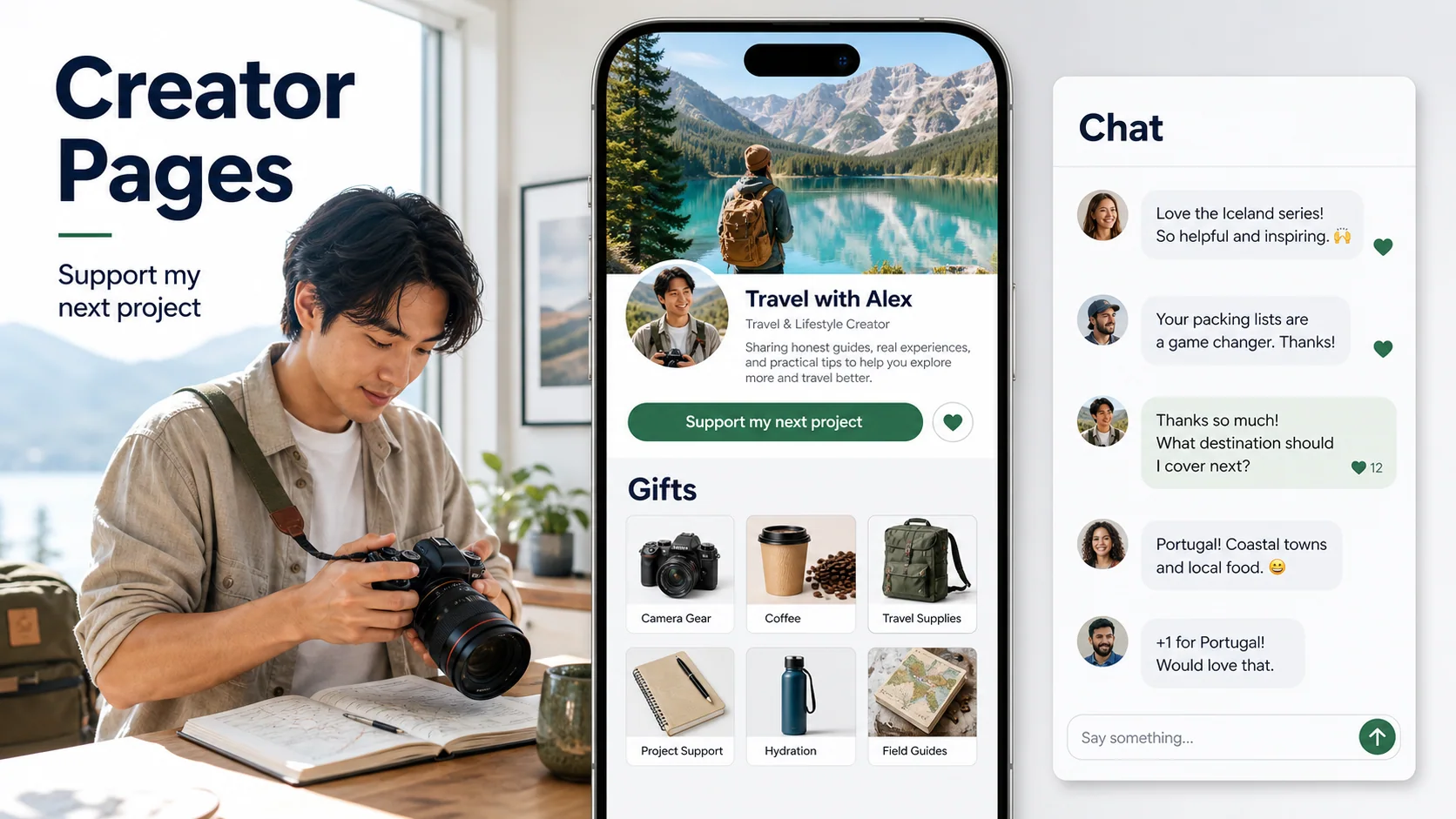
Lead with one main action
People reach your link in bio right after a post made them curious. Most will tap once and decide in a few seconds. Give them one obvious next step at the top, then a short list of other choices that each say exactly what happens.
Before you add anything, finish this sentence: “When someone opens my link, the one thing I want them to do is ___.” That might be buying a product, supporting you, booking a commission, joining a membership or reading your newsletter. Whatever it is goes first, as the biggest button.
Twelve equal buttons
Shop, Patreon, YouTube, TikTok, Twitch, Discord, podcast, old blog post, 2023 giveaway, contact, FAQ, affiliate codes. Visitors scan, guess and often leave.
One main action, then four choices
“Get the brush pack ($12)” first, then latest video, commissions, tip jar and newsletter. Social profiles sit underneath as small icons.
Where the link goes on each app
Every app handles bio links a little differently, and the rules change. Use this as a starting point, then check the Edit profile screen in each app.
| App | Where the link lives | What to watch for |
|---|---|---|
| Edit profile, in the links section under your bio | Your bio text is short, so use it to say why someone should tap. Keep the first link your main action. | |
| TikTok | Edit profile, in the website field | At the time of writing, TikTok's help center says the website field is for accounts with at least 1,000 followers and for verified business accounts. Until then, link your Instagram or YouTube on your profile. |
| YouTube | Channel customization, as channel links | Links show on your channel page. Also add the link to video descriptions, where most viewers actually look. |
| X | Edit profile, in the website field | One website field, so a link-in-bio page or your main offer belongs there. |
Use the same link everywhere. One address is easier to remember, easier to say out loud in a video, and lets you see all your clicks in one place.
What to include, in order
Most good link-in-bio pages follow the same order. Skip any part that does not apply to you.
- 1
Your main action
The product, membership, booking or support option you most want people to choose, with the price if it has one. Prices up front save everyone a question.
- 2
What people came for
Your latest video, the post that is going viral, or the thing people keep asking about in comments. Update it when your content changes.
- 3
Ways to work with you
Commissions, sessions, brand inquiries or a contact route, each with one line about what is included and when you are available.
- 4
Ways to stay close
A newsletter, a membership or a free download, plus your other profiles as small icons at the bottom rather than full buttons.
- A short line about you: who you are and what you make, in one sentence a stranger understands.
- A way to ask a question: visitors often want to know shipping times, file formats or whether commissions are open. Answering on the page beats sending them to your DMs.
- Disclosures: if a link pays you a commission, say so next to it. The FTC expects disclosures that people will actually see.
- Nothing outdated: remove last season's sale, closed commission slots and expired codes.
Five link-in-bio examples
These examples show the order in practice. Swap in your own offers and prices.
Commissions first
1. “Commission a portrait (from $45, 3 slots left)” 2. Latest speedpaint video 3. “Brush pack ($12)” 4. Tip jar 5. Instagram, TikTok and YouTube icons.
Why it works: the scarce, high-value option leads and says how many slots remain.Free start, paid next
1. “Free checklist” 2. “Templates bundle ($29)” 3. “Book a 1:1 call ($90)” 4. Newsletter 5. Podcast and YouTube icons.
Why it works: a free first step for new visitors, with clear paid steps beside it.Live now, then support
1. “Watch live (Tue, Thu, Sat 7pm ET)” 2. “Support the stream” with quick amounts 3. “Join the membership” 4. Discord 5. Clips channel.
Why it works: the schedule answers the most common question before anyone asks.New release first
1. “Listen to the new single” 2. “Tour dates” 3. “Signed vinyl wish” or merch 4. Tip jar 5. Streaming service icons.
Why it works: one release at a time, not every album ever made.Subscribe first
1. “Get the weekly letter” 2. “Read the most popular essay” 3. “Buy the e-book ($9)” 4. “Support my writing” 5. Social icons.
Why it works: the email list is the main action, and everything else builds trust in it.Write labels people tap
A button label should say what happens after the tap. Vague labels make people guess, and guessing loses clicks.
| Instead of | Try | Why |
|---|---|---|
| Shop | Brush pack for Procreate ($12) | Names the item and the price |
| Support me | Buy me a coffee ($5) | Shows the size of the ask |
| Work with me | Book a 1:1 call (30 min, $90) | Says what you get and for how long |
| Click here | Watch the full tutorial | Matches what the post promised |
| Commissions | Commissions: 3 slots open in May | Answers “are you open?” before anyone asks |
Mistakes that cost clicks
- Burying the main action: if your best offer is the sixth button, most visitors never see it.
- Sending people to a homepage: link to the exact product or page, not to a store front where they have to search again.
- Dead or old links: a closed sale or a 404 makes the whole page feel abandoned.
- No prices: hiding the price creates questions in your DMs instead of decisions on the page.
- No way to ask: visitors with one question leave when the only option is a DM you might not see for days.
- Changing everything every day: regular followers learn where things are. Keep the order stable and change one slot at a time.
A 10-minute monthly check
Once a month, open your link-in-bio page on your phone as a visitor would and go through this list.
- 1
Tap every link
Fix anything broken, sold out or out of date.
- 2
Read your clicks
Move links that nobody taps lower, or remove them.
- 3
Match your content
Make sure the second slot points to what your recent posts talk about.
- 4
Read your questions
If the same question keeps coming in, answer it on the page or in a button label.
A Loresta Page is a link in bio that also takes payments and answers common questions from answers you approve, so visitors can buy, support or ask without waiting for a DM. Selling is open to creators in about 100 countries, including the US, Canada, the UK, the EU, Japan, Mexico and India. To compare it with Linktree, Beacons, Stan Store and others, read the best link-in-bio tools for creators.
Research notes
Sources checked for this guide
Product details and policies can change. First-party pages were checked on October 20, 2026.
- Instagram Help: add a website to your Instagram profile
Instagram explains where links are added in Edit profile. Link limits and layout can change between app versions, so check your own Edit profile screen.
- Instagram Help: add a bio to your Instagram profile
Instagram's bio field has a character limit, which is why a short, specific line above the link matters.
- TikTok Support: links on your profile
TikTok describes who can add a website to their profile and how to link Instagram and YouTube accounts.
- YouTube Help: manage your channel's basic info
YouTube lets creators add links to their channel, which appear on the channel page.
- FTC: Disclosures 101 for social media influencers
If your link-in-bio page includes affiliate links or sponsored products, the FTC expects a clear disclosure people will actually see.
Questions creators ask next
Direct answers that keep the plan realistic.
What should I put in my link in bio?
Put the one thing you most want a new visitor to do first, such as buying, supporting or booking, then your latest or most popular content, a way to work with you, and your other social profiles as small icons. Everything on the page should help someone who just saw one of your posts take the next step.
How many links should a link-in-bio page have?
Keep three to five clear buttons above the fold. More links are fine further down, but each extra button competes with your main action. If a link has not been tapped in the last month, move it lower or remove it.
Can I add a link to my TikTok bio without 1,000 followers?
At the time of writing, TikTok's help center says the website field is available to accounts with at least 1,000 followers and to verified business accounts. Until then you can link your Instagram or YouTube on your TikTok profile and keep your link-in-bio page there, or mention it in your video captions.
Is a link-in-bio page better than linking straight to my shop?
If you sell exactly one thing and nothing else matters, link straight to it. Most creators have more than one next step, such as a product, a tip option and a newsletter, and a link-in-bio page lets each visitor pick the one that fits them.
Do I need to pay for a link-in-bio tool?
No. Several tools have a free plan, including Loresta, Linktree and Beacons. The real cost is usually the fee on sales, so compare what each tool takes from a typical sale before you choose.
Turn your link in bio into a Page that sells
Claim your name and paste your link. Loresta builds a free Page for tips, offers and answers to your followers' questions. Nothing goes live until you publish.
Compare plans